
A page title can be descriptive without making a good website address. Copying every word from a long headline into a URL often creates an address that is difficult to read, share, and maintain.
To create an SEO-friendly URL slug, choose words that describe the page, separate them with hyphens, use consistent lowercase formatting, and remove unnecessary wording without losing meaning. Review the complete URL before publishing.
For example, a page titled “How to Create Clear URL Slugs for Your Website” could use:
/blog/create-clear-url-slugs/
A slug converter can help with formatting, but you still need to check whether the result accurately describes your content.
What Is a URL Slug?
A URL slug is the readable part of a website address that identifies a particular page.
Consider this URL:
https://www.quicktooldesk.com/tools/text-to-slug-converter/
Here:
quicktooldesk.comis the domain./tools/is the parent path.text-to-slug-converteris the page slug.
The slug gives readers a useful clue about what they will find before opening the page.
What Makes a URL Slug SEO-Friendly?
Google recommends descriptive URLs, hyphens between words, and consistent letter casing. These choices help make website addresses easier to understand. Google’s URL structure guidance explains these recommendations.
For your own publishing workflow, use a simple test: could someone reasonably understand the page topic from its address?
Compare:
/blog/post-8472/
with:
/blog/title-case-vs-sentence-case/
The second address communicates the subject more clearly. However, a readable slug alone does not establish that a page deserves a high search ranking.
How to Create a Clear URL Slug
1. Identify the Main Topic
Start with what the page actually helps the reader do.
For a guide about counting words in an essay, a suitable slug might be:
count-words-in-an-essay
Avoid adding unrelated terms simply because you would like to rank for them.
2. Shorten the Title Thoughtfully
Your slug does not need to repeat the complete headline.
Page title:
“How to Count Words in an Essay Before Submitting Your Assignment”
Possible slug:
count-words-in-an-essay
The shorter version retains the subject. Removing words should improve readability without making the address vague.
3. Separate Words with Hyphens
Use:
text-to-slug-converter
instead of:
text_to_slug_converter
or:
texttoslugconverter
Google specifically recommends hyphens rather than underscores for separating words in URLs.
4. Keep Formatting Consistent
Lowercase slugs are a practical convention for a website publishing process.
For example:
online-notepad
Keep the same convention across new pages rather than mixing styles such as Online-Notepad and online-notepad. URL paths can be case-sensitive, so consistency matters.
5. Keep Useful Numbers and Words
Do not automatically delete every number or common word.
A year may be useful for an annual report:
writing-trends-2026
A number may distinguish a software version:
version-2-setup-guide
Similarly, words such as “to” and “vs” can make a slug easier to interpret. Choose clarity over aggressive shortening.
6. Review the Full Address
Check the slug together with its parent path.
A clear slug can still produce an awkward URL if the surrounding folders repeat the same words.
Before publishing, confirm that the address matches the page and fits your existing website structure.
URL Slug Examples
These examples illustrate editorial choices rather than ranking scores.
| Page title | Less useful slug | Clearer slug |
|---|---|---|
| How to Count Words in an Essay | new-post-final-2 | count-words-in-an-essay |
| Title Case vs Sentence Case | titlecasesentencecase | title-case-vs-sentence-case |
| How to Convert Text into a URL Slug | text-slug-url-convert-best-free | convert-text-to-url-slug |
| Online Notepad for Saving Browser Notes | notes-tool-page | online-notepad |
| Writing Trends Report 2026 | report | writing-trends-2026 |
A clearer slug should describe the specific page, not make promises that its content cannot support.
Common URL Slug Mistakes
Repeating Keywords
A slug such as:
slug-generator-url-slug-maker-best-slug-tool
is repetitive and difficult to read.
Choose the wording that best identifies the page instead of combining every keyword variation.
Making the Slug Too Vague
Addresses such as guide, article, or tool provide little context.
Add enough information to distinguish the page from other content on your website.
Treating a Character Limit as an SEO Rule
A length limit can help you edit, but it should not force you to remove essential meaning.
Review the final wording rather than chasing an arbitrary score.
Removing Dates That Define the Content
An annual report may need its year. An evergreen tutorial may not.
Decide based on the page’s purpose and how you expect to maintain it.
Assuming Every Generated Slug Is Unique
Different titles can produce identical slugs.
Check your existing website URLs before publishing, even when a converter checks duplicates within a batch.
Changing Published Slugs Without Checking Old Links
A published slug is part of an address that readers, other websites, and search engines may already use. Changing it needs more care than editing an unpublished draft.
Which Tools Can Help You Create URL Slugs?
Different tools support different parts of the workflow.
| Tool | Useful for | What you still need to review |
|---|---|---|
| Quick Tool Desk Text to Slug Converter | Formatting individual titles or batches of titles | Meaning, existing website URLs, and final CMS address |
| WordPress Slug or Permalink field | Applying the slug to a post or page | Complete URL and any changes to a published address |
| Spreadsheet | Organising proposed titles and slugs for a content calendar | Duplicate entries and publishing status |
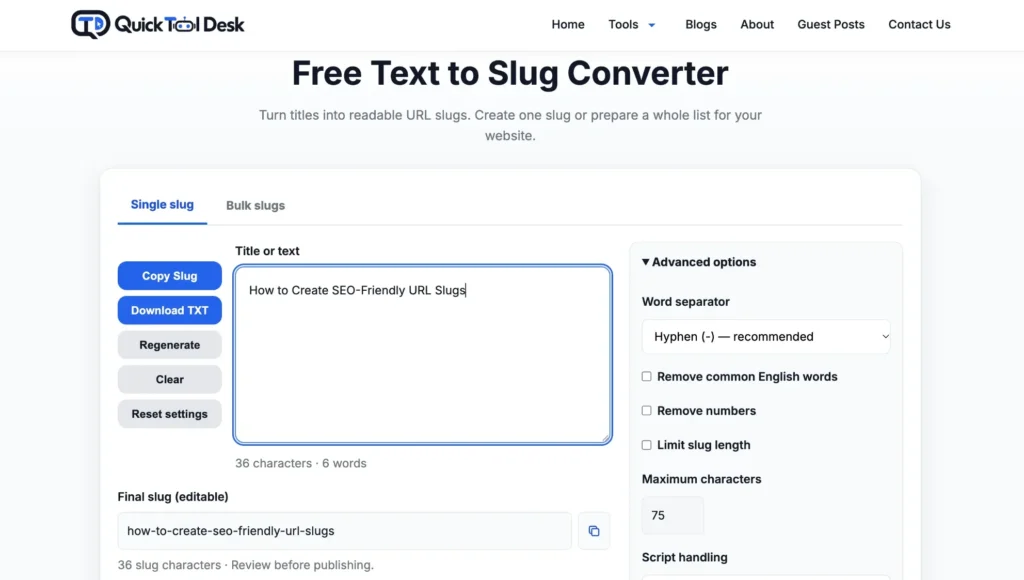
Quick Tool Desk Text to Slug Converter
The Quick Tool Desk Text to Slug Converter helps turn titles into readable slugs.
Its available features include:
- Single and bulk conversion.
- Editable slug results.
- Optional removal of common English words or numbers.
- Optional length limits.
- Unicode or ASCII script handling.
- Full URL previews.
- CSV import and export.
- Duplicate handling within the current batch.
The URL preview does not check whether an address exists. Batch duplicate handling also does not check URLs already published on your website.
Use the generated result as a draft, then review it before adding it to your CMS.
WordPress
WordPress uses the post slug as part of its permalink structure. You can review and edit the slug in the post or page editor. See the WordPress permalink documentation for details.
For an individual post, work with that post’s slug field. Review the complete address before publishing rather than changing the website’s global permalink structure just to shorten one URL.
A Spreadsheet
For a larger content calendar, keep columns for the page title, proposed slug, complete URL, and publishing status.
This makes it easier to review several planned addresses together. It also helps identify repeated topics or proposed slugs before publication.
A Practical Workflow for WordPress
- Write the page title and identify its main topic.
- Generate a draft slug using the converter or write one manually.
- Review the wording and check existing website URLs.
- Open the relevant WordPress post or page.
- Find its Slug or Permalink setting.
- Enter the reviewed slug.
- Confirm the complete address before publishing.
- Open the published URL and test relevant internal links.
For example, this article can have a detailed title while using the shorter slug:
seo-friendly-url-slugs
What If You Need to Change a Published Slug?
First, decide whether the change solves a meaningful problem. A slightly shorter address may not justify disrupting existing links.
When a page permanently moves to a new URL, Google recommends a permanent server-side redirect, such as HTTP 301 or 308. See Google’s guidance on redirects.
After making the change:
- Test that the old URL redirects to the intended new page.
- Update internal links to the new address.
- Review the page’s canonical URL.
- Confirm that the sitemap contains the current URL.
- Check for broken links or unnecessary redirect chains.
Do not assume that editing the slug has completed all these tasks automatically.
Frequently Asked Questions
Is a URL slug the same as a permalink?
No. The permalink is the complete permanent address. The slug is one component of that address.
Should a slug contain the main keyword?
Use relevant wording when it accurately describes the page. Avoid forcing multiple keyword variations into the address.
Should I remove words such as “a,” “the,” and “to”?
Only when removing them keeps the meaning clear. Automatic removal still needs a human review.
Can I use Hindi or other non-English words?
Yes. Google supports URLs using your audience’s language. Check how your CMS handles the characters and how the resulting link appears when copied or shared.
Can a slug converter check my existing website URLs?
Quick Tool Desk checks repeated results within the current batch. You must separately check addresses already on your website.
Will a better slug guarantee higher rankings?
No. A slug describes a page’s address; it does not assess the quality or usefulness of the page itself.
Create Your Next Slug
Start with your page title, keep the words that communicate its purpose, and review the complete address before publishing.
Use the free text-to-slug tool to prepare a single slug or a batch for your next content update.